![RTFM! DevOps[at]UA](https://substackcdn.com/image/fetch/$s_!ruIs!,w_80,h_80,c_fill,f_webp,q_auto:good,fl_progressive:steep,g_auto/https%3A%2F%2Fsubstack-post-media.s3.amazonaws.com%2Fpublic%2Fimages%2F78e47926-bd0f-4929-a081-2588cc2a3d82_90x95.jpeg)
Golang: creating OpenAI Exporter for VictoriaMetrics
Step-by-step example of creating an OpenAI Exporter for VictoriaMetrics in Go - use of the VictoriaMetrics Go client, pushing metrics, and graceful shutdown with Golang context

Got a new task to monitor costs on OpenAI - to see how much each project spends per day, and send alerts to Slack if costs exceed a set threshold.

I tried several existing exporters for the OpenAI API, but none provided cost metrics per project - so we’ll build one ourselves.
To create the exporter, let’s use Golang. The idea is simple: get data from the OpenAI API, generate metrics, and send them to VictoriaMetrics instance.
I last used Go in 2019 (just a single time), so we’ll refresh how things work and occasionally dive into the internals of some libraries.
So, the primary goal of this post is to demonstrate how to build an API client in Go, work with Go structs and JSON, and use the VictoriaMetrics Go client - including a look at how it works under the hood - to generate metrics and push them into a VictoriaMetrics instance for further use in VMAlert.
Also, it’s worth checking out the VictoriaMetrics blog - their team has been working with Go for many years and offers a lot of in-depth, practical Go content.
Let’s go.
OpenAI API
OpenAI API documentation - Costs, and its returned value - Costs object.
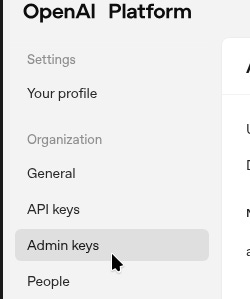
To access Costs, you need a separate key - create it at platform.openai.com in Admin keys:
To obtain Costs, you need to set the start_time parameter in Unix format. Let’s set it to a variable:
$ TODAY=$(date -d “$(date +%Y-%m-%d) 00:00:00” +%s)
$ echo $TODAY
1762898400
And check access with curl:
$ curl -s -H “Content-Type: application/json” -H “Authorization: Bearer $OPENAI_ADMIN_KEY” “https://api.openai.com/v1/organization/costs?start_time=$TODAY”
{
  “object”: “page”,
  “has_more”: false,
  “next_page”: null,
  “data”: [
    {
      “object”: “bucket”,
      “start_time”: 1762819200,
      “end_time”: 1762905600,
      “results”: [
        {
          “object”: “organization.costs.result”,
          “amount”: {
            “value”: 5.65750295,
            “currency”: “usd”
...
OK, access is working - let’s go to Golang.
Golang gore REPL
I prefer working in the console, and since my primary language is Python - I really like being able to run quick experiments using terminal-based tools.
For Go, we can use the gore package:
$ go install github.com/x-motemen/gore/cmd/gore@latest
Run (don’t forget to add $GOPATH/bin to $PATH) and check that you are getting the current date and time:
$ gore
gore version 0.6.1  :help for help
gore> :import time
gore> time.Now()
%!t(int64=1763025027)2025-11-13 11:10:27 Local
Or just use Go Playground.
Creating a Golang API client
First, we will write a client that will call the OpenAI API and display the result on the console, and then we will add VictoriaMetrics metric generation.
What we need for API requests:
have a URL
have time
for now, we’ll just output the result to the console
Create a project directory and perform initialization:
$ mkdir ~/Work/atlas-monitoring/exporters/openai-exporter
$ go mod init openai-exporter
For the API client, we can use the standard library net/http, or more specialized types such as resty or sling.
I decided to try resty because it’s interesting, the code looks nicer, and it has a nice way to pass parameters.
Documentation on resty - here>>> and here>>>.
Restyu version 3 is already available, but it is still in beta, so we will take the second one.
Let’s try with resty first in gore:
gore> :import “github.com/go-resty/resty/v2”
gore> client := resty.New()
...
gore> resp, err := client.R().Get(”https://httpbin.org/get”)
...
gore> fmt.Println(resp, err)
...
313
nil
To execute API requests, first call the New() method to create an object of the type Client struct, and then use the R() (request) method to make calls.
Documentation for New() here>>>, its code here>>>.
In Go, types don’t explicitly list their methods in the source, but all associated methods are clearly visible through go doc:
$ go doc github.com/go-resty/resty/v2.Client | grep “New()\|R()”
func New() *Client
func (c *Client) R() *Request
The Usage section contains the following example:
...
resp, err := client.R().
    EnableTrace().
    Get(”https://httpbin.org/get”)
...
Where resty uses method chaining, when methods of a certain type return the same type.
How it looks:
with the
resty.New()function, we create a client -New()returns*Client structwith its associated methods.for
Client struct, there is a method R() that returns*Request struct.for the
Requeststructure, we have theEnableTrace()method, which also returnsRequest.and for the same
Requestwe have theGet()method, which also returnsRequestpluserror
This allows us to build chained calls such as: Client => R() => Request => EnableTrace() => Request => Get().
Okay, let’s get to the code.
Creating a resty client
Create a main.go file:
package main

import (
  “fmt”

  “github.com/go-resty/resty/v2”
)

// set global const as ay be used in other packages
const (
  baseURL   = “https://api.openai.com/v1”
  costsPath = “/organization/costs”
)

func main() {
  client := resty.New()

  // build ‘https://api.openai.com/v1/organization/costs’
  response, err := client.R().Get(baseURL + costsPath)
  if err != nil {
    panic(err)
  }

  fmt.Println(response)
}
Run it to test:
$ go run main.go
{
  “error”: {
    “message”: “You didn’t provide an API key. You need to provide your API key in an Authorization header using Bearer auth (i.e. Authorization: Bearer YOUR_KEY). You can obtain an API key from https://platform.openai.com/account/api-keys.”
...
Great, it works.
Now let’s add getting the API key from a variable.
Use os:
...
import (
  “fmt”
  “os”
...
func main() {
  client := resty.New()

  apiKey = os.Getenv(”OPENAI_ADMIN_KEY”)
...
Next, we need to add an auth header to our request, this can be done using the func (*Client) SetAuthToken method, which simply adds a value to the Token field in the Client object.
There is also a separate method func (r *Request) SetAuthToken, which sets the token for specific requests rather than for the entire client, but in our case, we make it simpler by using the general Client.
Let’s do method chaining from the example above - for Client we call SetAuthToken(), which sets the token, then call R() to create a request, and then call Get(), to which we pass the URL:
...
  apiKey := os.Getenv(”OPENAI_ADMIN_KEY”)

  // build ‘https://api.openai.com/v1/organization/costs’
  response, err := client.SetAuthToken(apiKey).R().Get(baseURL + costsPath)
...
Let’s check:
$ go run main.go
{
  “error”: {
    “message”: “Missing query parameter ‘start_time’”,
...
OK, we’ve passed authentication, now we need to add the parameters.
Here we have four options:
func (r *Request) SetQueryParam(param, value string) *Request: sets one parameter key=value, can be used if there are only 1-2 parameters in total
func (r *Request) SetQueryParams(params map[string]string) *Request: similar, but accepts a
mapwith a list of parametersfunc (r *Request) SetQueryParamsFromValues(params url.Values) *Request: if the
httplibrary is used, parameters can be passed via theurl.Valuestypefunc (r *Request) SetQueryString(query string) *Request: passes a ready list of parameters in a single string, for example -
SetQueryString(”a=1&b=2”)
Right now, we only need start_time, but we will be adding more parameters later, so we can write them all to a map, which we will then pass to a SetQueryParams() call.
For start_time, we need to pass the time - do this with time.Now().
The time to the OpenAI API must be provided in the Unix format, so add the Unix() function.
Let’s check how it will look in gore:
gore> :import time
gore> timeNow := time.Now().Unix()
1762956432
Now add a code to create the timeNow variable with the time, create setQueryParams map of strings with a list of parameters also in strings, and add the SetQueryParams() call to the client:
...
  timeNow := time.Now().Unix()

  setQueryParams := map[string]string{
    “start_time”: timeNow,
  }

  // build ‘https://api.openai.com/v1/organization/costs’
  response, err := client.SetAuthToken(apiKey).
    R().SetQueryParams(setQueryParams).
    Get(baseURL + costsPath)
...
But if you call this code now, you’ll get an error because timeNow := time.Now().Unix() returns an int64:
gore> fmt.Printf(”%t”, timeNow)
%!t(int64=1762957173)21
nil
And in setQueryParams(), we need to pass a string, because SetQueryParams() accepts a map with a string:
func (r *Request) SetQueryParams(params map[string]string) *RequestTherefore, convert our variable timeNow to a string using strconv.FormatInt():
gore> :import strconv
gore> s := strconv.FormatInt(timeNow, 10)
gore> fmt.Printf(”%t”, s)
%!t(string=1763371451)22
And now, our variable timeNow looks like this:
...
timeNow := strconv.FormatInt(time.Now().Unix(), 10)
...
Run, and check the result:
$ go run main.go
{
  “object”: “page”,
  “has_more”: false,
  “next_page”: null,
  “data”: [
    {
      “object”: “bucket”,
      “start_time”: 1762905600,
      “end_time”: 1762992000,
      “results”: [
        {
          “object”: “organization.costs.result”,
          “amount”: {
            “value”: 6.442440250000003,
            “currency”: “usd”
          },
          “line_item”: null,
          “project_id”: null,
          “organization_id”: “org-ORG”
...
Great, we have the data we need.
Now we have to add one more parameter - group_by=project_id:
...
  setQueryParams := map[string]string{
    “start_time”: timeNow,
    “group_by”:   “project_id”,
  }
...
And after this, we have data for each project_id in the results:
$ go run main.go
{
  “object”: “page”,
  “has_more”: false,
  “next_page”: null,
  “data”: [
    {
      “object”: “bucket”,
      “start_time”: 1762905600,
      “end_time”: 1762992000,
      “results”: [
        {
          “object”: “organization.costs.result”,
          “amount”: {
            “value”: 1.76643575,
            “currency”: “usd”
          },
          “line_item”: null,
          “project_id”: “proj_1”,
          “organization_id”: “org-ORG”
        },
        {
          “object”: “organization.costs.result”,
          “amount”: {
            “value”: 0.47790999999999995,
            “currency”: “usd”
          },
          “line_item”: null,
          “project_id”: “proj_2”,
          “organization_id”: “org-ORG”
        },
...
Next, we need to store the result in a variable for further work.
resty JSON Unmarshall
resty supports automatic JSON unmarshalling via the SetResult() method:
func (r *Request) SetResult(res interface{}) *Request {
  if res != nil {
    r.Result = getPointer(res)
  }
  return r
}
It accepts the argument type any (interface{}), passes it to its function getPointer(), where it checks whether it is a pointer type:
func getPointer(v interface{}) interface{} {
  vv := valueOf(v)
  if vv.Kind() == reflect.Ptr {
    return v
  }
  ...
}
Then, SetResult() calls parseResponseBody() to write the value from Request.Result to the object that was passed as an argument to SetResult():
...
  // default after response middlewares
  c.afterResponse = []ResponseMiddleware{
    parseResponseBody,
    saveResponseIntoFile,
  }
...
And in the function parseResponseBody() the method Unmarshalc is called, which then calls Client.JSONUnmarshal(), and the field JSONUnmarshal contains the function json.Unmarshal():
...
func createClient(hc *http.Client) *Client {
  if hc.Transport == nil {
    hc.Transport = createTransport(nil)
  }

  c := &Client{ // not setting lang default values
                ...
    JSONUnmarshal:          json.Unmarshal,
...
See source code of the resty/v2/client.go.
So, we get the result in JSON, and by using SetResult() we can save the necessary fields in some object.
Creating a Go struct for JSON Unmarshall
Let’s think about how we want to structure the data.
We have project_id and amount - how much this project has spent, which we get from the OpenAI API /organization/costs.
We also have Project Names, which we can get from /organization/projects, but more on that later.
As a result, we can build something like this:
[
  {
    “project_id”: “Id1”,
    “project_name”: “Name1”,
    “project_spend”: 100
  },
  {
    “project_id”: “Id2”,
    “project_name”: “Name2”,
    “project_spend”: 200
  }
]
What does Go offer for this?
array, array: fixed length, indexed type, all objects of the same type -
[3]int{1,2,3}slice: similar to array, but not fixed length -
[]int{1,2,3}maps: a set of key:value elements of variable length of the same type -
map[string]string{”key_name”: “value_value”}structs: a complex type that can include other types -
struct{ Name string; Age int }{ Name: “Nino”, Age: 35 }
Since we know what types we get from the API and all the fields in them, a slice of structs will work for us, where each element of the slice will be a structure with fields in which we will store project_id, amount, and project_name.
Go struct for the Project ID and Amount
The structure for us may look like this:
type ProjectSpend struct {
  ProjectID    string
  ProjectSpend int
}
Then, let’s create a slice with this structure:
data := []ProjectSpend{}Now let’s take a look at what the OpenAI API returns.
The /organization/costs response is:
{
  “object”: “page”,
  “has_more”: false,
  “next_page”: null,
  “data”: [
    {
      “object”: “bucket”,
      “start_time”: 1763078400,
      “end_time”: 1763164800,
      “results”: [
        {
          “object”: “organization.costs.result”,
          “amount”: {
            “value”: 2.16911625,
            “currency”: “usd”
          },
          “line_item”: null,
          “project_id”: “proj_1”,
          “organization_id”: “org-ORG”
        },
        {
          “object”: “organization.costs.result”,
          “amount”: {
            “value”: 0.1846203,
            “currency”: “usd”
          },
          “line_item”: null,
          “project_id”: “proj_2”,
          “organization_id”: “org-ORG”
        },
        ...
      ]
    }
  ]
}
Here we have the following structure:
begins with JSON
object {}has several JSON properties -
“object”: “page”, etcfollowed by an array
data []which contains another
object {}which starts with properties
“object”: “bucket”, etcand in which there is another array
results []which includes another
object {}which starts with property
“object”: “organization.costs.result”followed by property
amount, which contains a nestedobject {}with two properties -
value and value
If we want to reflect this to a Go struct, we need to create several structures that will transfer data to each other:
the first structure “captures” the fitst
data[]the second structure receives
results[]the third receives the value of the field
project_idand the fourth reads
amount
How this might look in code, using struct composition, when one struct contains a field whose type is another struct:
type ResponceAmount struct {
  Value float64
}

type ResponceProjectID struct {
  ProjectID string `json:”project_id”`
  Amount    ResponceAmount
}

type ResponseResults struct {
  Results []ResponceProjectID
}

type ResponseData struct {
  Data []ResponseResults
}

res := &ResponseData{}
And now we can execute json.Unmarshall by calling SetResult(), to which we pass a pointer - res := &ResponseData{}:
...
  _, err := client.SetAuthToken(apiKey).
    R().SetQueryParams(setQueryParams).
    SetResult(res).
    Get(baseURL + costsPath)

fmt.Println(”Result: “, res)
...
The result is:
$ go run main.go
...
Result:  &{[{[{proj_1 {2.16911625}} {proj_Agtar0XzJdXXLhGt8YCRNZMY {0.1846203}} {proj_2 {0.1531728}} {proj_3 {0.19788874999999997}}]}]}
Or we can make it more concise by using nested anonymous structs:
...
  // catch data[] and pass to nested struct
  // catch results[] and pass to next nested struct
  // catch ‘project_id’ property to the ‘ProjectID’ field, and pass to next nested struct
  // catch ‘amount’ property to the ‘Amount’ field, and pass to next nested struct
  // finally, catch ‘value’ property to the ‘Value’ field
  type ResponseData struct {
    Data []struct {
      Results []struct {
        ProjectID string `json:”project_id”`
        Amount    struct {
          Value float64
        }
      }
    }
  }
...
And we will get the same result.
Next, we will need to generate metrics with labels.
We do this in two for loops, in which we iterate through the fields of each structure:
...
  // catch each item from the ‘Response.Data[]’
  for _, dataItem := range res.Data {
    // catch each iteam from the ‘Response.Data[].Results[]’
    for _, result := range dataItem.Results {

      project := result.ProjectID
      amount := result.Amount.Value

      // print in VictoriaMetrics gauge format
      fmt.Printf(”openai_stats{type=\”costs\”, project=\”%s\”} %f\n”, project, amount)
    }
  }
...
Result now:
$ go run main.go
openai_stats{type=”costs”, project=”proj_1”} 2.170784
openai_stats{type=”costs”, project=”proj_2”} 0.241411
openai_stats{type=”costs”, project=”proj_3”} 0.213558
openai_stats{type=”costs”, project=”proj_4”} 0.198619
Now let’s do the same for project names, because using values like “proj_123” in metric labels isn’t very useful - it’s better to display human-readable project names instead.
Go struct for the Project Names
Add a second endpoint, see the documentation List projects:
...
const (
  baseURL      = “https://api.openai.com/v1”
  costsPath    = “/organization/costs”
  projectsPath = “/organization/projects”
)
...
And move the execution of requests to OpenAI to a dedicated function:
...
func getOpenAi(client *resty.Client, path string, out any) error {
  _, err := client.R().
    SetResult(out).
    Get(path)
  return err
}
...
Move setting the OPENAI_ADMIN_KEY key and parameters to the client creation call with the resty.New().
Next, call our function getOpenAi(), and pass the created and configured client as the first argument:
...
func main() {
  //client := resty.New()

  apiKey := os.Getenv(”OPENAI_ADMIN_KEY”)
  timeNow := strconv.FormatInt(time.Now().Unix(), 10)

  setQueryParams := map[string]string{
    “start_time”: timeNow,
    “group_by”:   “project_id”,
  }

  // use pointer to ResponseData struct
  // as ‘json.Unmarshal’ requires a pointer to write results
  costsRes := &CostsResponseData{}

  client := resty.New().
    SetAuthToken(apiKey).
    SetQueryParams(setQueryParams)

  getOpenAi(client, baseURL+costsPath, costsRes)

  fmt.Println(”Result: “, costsRes)
...
Run to check:
$ go run main.go
Result:  &{[{[{proj_1 {2.1707842499999996}} {proj_2 {0.24141089999999998}} {proj_3 {0.21355799999999994}} {proj_4 {0.46123659999999994}}]}]}
openai_stats{type=”costs”, project=”proj_1”} 2.170784
openai_stats{type=”costs”, project=”proj_2”} 0.241411
...
Now let’s move on to obtaining project names.
A request to api.openai.com/v1/organization/projects will return data in the following format:
{
    “object”: “list”,
    “data”: [
        {
            “id”: “proj_abc”,
            “object”: “organization.project”,
            “name”: “Project example”,
            “created_at”: 1711471533,
            “archived_at”: null,
            “status”: “active”
        }
    ],
    “first_id”: “proj-abc”,
    “last_id”: “proj-xyz”,
    “has_more”: false
}
We do the same as when obtaining costs - add a structure:
...
type ProjectsResponse struct {
  Data []struct {
    ID   string
    Name string
  }
}
...
And in the main(), add a second call to thegetOpenAi() and errors handling:
...
  // use pointer to ResponseData struct
  // as ‘json.Unmarshal’ requires a pointer to write results
  costsRes := &CostsResponseData{}
  if err := getOpenAi(client, baseURL+costsPath, costsRes); err != nil {
    panic(err)
  }

  projectsRes := &ProjectsResponse{}
  if err := getOpenAi(client, baseURL+projectsPath, projectsRes); err != nil {
    panic(err)
  }

  fmt.Println(”Costs Result: “, costsRes)
  fmt.Println(”Projects Result: “, projectsRes)
...
And now, we have the following result:
$ go run main.go
Costs Result:  &{[{[{proj_1 {2.1707842499999996}} {proj_2 {0.24141089999999998}} {proj_3 {0.21355799999999994}} {proj_4 {0.46123659999999994}}]}]}
Projects Result:  &{[{proj_1 Default project} {proj_2 Assistant Test/Eval} {proj_3 Kraken Production} {proj_4 Knowledge Base}]}
...
sanitizing names - formatting values with strings.Replace()
But our names contain spaces and “/” symbols, and project names contain capital letters - and we want our metric labels to look like “my_project_name“.
Let’s add a function that will perform normalization using the ToLower() and ReplaceAll() methods from the strings package:
...
func normalizeLabel(s string) string {
  s = strings.ToLower(s)
  s = strings.ReplaceAll(s, “ “, “_”)
  s = strings.ReplaceAll(s, “/”, “_”)
  return s
}
...
The next step is to build a map in which we will have project_id and project_names:
...
  projectNames := make(map[string]string)

  // get each ‘ProjectsResponse.Data[].ID’
  // get each ‘ProjectsResponse.Data[].Name’
  // populate the projectNames map with:
  // ‘project_id’ = ‘project_name’
  for _, p := range projectsRes.Data {
    projectNames[p.ID] = normalizeLabel(p.Name)
  }

  fmt.Println(”Projects Names: “, projectNames)
...
As a result, we have:
$ go run main.go
Projects Names:  map[proj_1:kraken_production proj_2:assistant_test_eval proj_3:knowledge_base proj_4:default_project]
Now let’s update our two loops - let’s use names instead of IDs in the label:
...
  // catch each item from the ‘Response.Data[]’
  for _, dataItem := range costsRes.Data {
    // catch each item from the ‘Response.Data[].Results[]’
    for _, result := range dataItem.Results {

      // get ‘’Response.Data[].Results[].ProjectID’
      id := result.ProjectID

      // get ‘’Response.Data[].Results[].Amount.Value’
      amount := result.Amount.Value

      // use the ‘id’ to get the project name from the projectNames map
      project := projectNames[id]
      if project == “” {
        project = “unknown”
      }

      // print in VictoriaMetrics gauge format
      fmt.Printf(”openai_stats{type=\”costs\”, project=\”%s\”} %f\n”, project, amount)
    }
  }
...
And the result:
$ go run main.go
openai_stats{type=”costs”, project=”knowledge_base”} 2.170784
openai_stats{type=”costs”, project=”kraken_production”} 0.241411
openai_stats{type=”costs”, project=”assistant_test_eval”} 1.083077
openai_stats{type=”costs”, project=”default_project”} 0.461237
Now we have the following code:
package main

import (
  “fmt”
  “os”
  “strconv”
  “strings”
  “time”

  “github.com/go-resty/resty/v2”
)

// set global const as ay be used in other packages
const (
  baseURL      = “https://api.openai.com/v1”
  costsPath    = “/organization/costs”
  projectsPath = “/organization/projects”
)

// catch data[] and pass to nested struct
// catch results[] and pass to next nested struct
// catch ‘project_id’ property to the ‘ProjectID’ field, and pass to next nested struct
// catch ‘amount’ property to the ‘Amount’ field, and pass to next nested struct
// finally, catch ‘value’ property to the ‘Value’ field
type CostsResponseData struct {
  Data []struct {
    Results []struct {
      ProjectID string `json:”project_id”`
      Amount    struct {
        Value float64
      }
    }
  }
}

type ProjectsResponse struct {
  Data []struct {
    ID   string
    Name string
  }
}

func getOpenAi(client *resty.Client, path string, out any) error {
  _, err := client.R().
    SetResult(out).
    Get(path)
  return err
}

func normalizeLabel(s string) string {
  s = strings.ToLower(s)
  s = strings.ReplaceAll(s, “ “, “_”)
  s = strings.ReplaceAll(s, “/”, “_”)
  return s
}

func main() {
  //client := resty.New()

  apiKey := os.Getenv(”OPENAI_ADMIN_KEY”)
  timeNow := strconv.FormatInt(time.Now().Unix(), 10)

  setQueryParams := map[string]string{
    “start_time”: timeNow,
    “group_by”:   “project_id”,
  }

  client := resty.New().
    SetAuthToken(apiKey).
    SetQueryParams(setQueryParams)

  // use pointer to ResponseData struct
  // as ‘json.Unmarshal’ requires a pointer to write results
  costsRes := &CostsResponseData{}
  if err := getOpenAi(client, baseURL+costsPath, costsRes); err != nil {
    panic(err)
  }

  projectsRes := &ProjectsResponse{}
  if err := getOpenAi(client, baseURL+projectsPath, projectsRes); err != nil {
    panic(err)
  }

  projectNames := make(map[string]string)

  // get each ‘ProjectsResponse.Data[].ID’
  // get each ‘ProjectsResponse.Data[].Name’
  // populate the projectNames map with:
  // ‘project_id’ = ‘project_name’
  for _, p := range projectsRes.Data {
    projectNames[p.ID] = normalizeLabel(p.Name)
  }


  // catch each item from the ‘Response.Data[]’
  for _, dataItem := range costsRes.Data {
    // catch each item from the ‘Response.Data[].Results[]’
    for _, result := range dataItem.Results {

      // get ‘’Response.Data[].Results[].ProjectID’
      id := result.ProjectID

      // get ‘’Response.Data[].Results[].Amount.Value’
      amount := result.Amount.Value

      // use the ‘id’ to get the project name from the projectNames map
      project := projectNames[id]
      if project == “” {
        project = “unknown”
      }

      // print in VictoriaMetrics gauge format
      fmt.Printf(”openai_stats{type=\”costs\”, project=\”%s\”} %f\n”, project, amount)
    }
  }
}
Now we can move on to creating real metrics and recording them in VictoriaMetrics.
Planning metrics for VictoriaMetrics
So, our metrics will be in the form of openai_stats{type=”costs”, project=”prodject_id”} 5.55.
And what does the problem say you need to do as a result?
if daily spending on OpenAI exceeds the average for the last few days (with a certain threshold) - shout in Slack
So, we will need the daily amount, and once we have it, we can make comparisons with previous periods.
And what do we get back in the API?
Let’s check the Costs object:
The aggregated costs details of the specific time bucket.
And what do we get when we make a request only with start_time without end_time?
Let’s examine the time in the response received:
...
      “start_time”: 1762905600,
      “end_time”: 1762992000,
...
Here, start_time will be:
$ date -d @1762905600
Wed Nov 12 02:00:00 EET 2025
А end_time:
$ date -d @1762992000
Thu Nov 13 02:00:00 EET 2025
It is 00:00 UTC.
That is, it returns the amount spent for today, for the current day, because this text was written on the 12th Nov.
So here it is:
...
      “start_time”: 1762905600,
      “end_time”: 1762992000,
      ...
            “value”: 1.76643575,
            “currency”: “usd”
          },
          “line_item”: null,
          “project_id”: “proj_1”,
...
We can see that today the project with ID “proj_1“ spent 1.76643575 bucks.
Okay...
How can we store this in metrics? Create a Counter type that constantly increases and update it every minute or hour?
Then the time series (see What is a Time Series?) for this metric will look something like this:
openai_stats{type=”costs”, project=”prodject_id”}
  1762960223 1.76
  1762960237 1.80
  1762960249 1.95
And then we can create a request for the alert, something like this:
if
avg_over_time(openai_stats{type=”costs”, project=”prodject_id”}[1d)
>
avg_over_time(openai_stats{type=”costs”, project=”prodject_id”}[3d)
then send alert
But there is an important caveat with a Counter: it resets its value if the exporter restarts, see counter reset.
In addition, if we receive data starting at 00:00, then from the next day the value will start at 0.00 USD.
This means the metric value can go both up and down, so we need a Gauge rather than a Counter.
VictoriaMetrics Go client
There is a Prometheus client library for Go, but for our purposes we’ll use the VictoriaMetrics package, which also includes a PushMetrics() function to send metrics directly to a VictoriaMetrics endpoint. without needing to have a dedicated scrape job.
Create metrics with NewGauge()
Let’s look at the documentation for type Gauge, where there is an example of creating a metric object.
The NewGauge() function takes two arguments: the name of the metric with labels and the function that updates the value for this metric, see gauge.go:
func NewGauge(name string, f func() float64) *Gauge {
  return defaultSet.NewGauge(name, f)
}
But if we want to set the value ourselves, instead of passing the second argument f func(), we can simply pass nil and then use the Set() method.
Let’s try how it works with nil and Set():
gore> :import “github.com/VictoriaMetrics/metrics”
gore> g := metrics.NewGauge(`test_gauge`, nil)
gore> g.Set(9.00)
gore> :import fmt
gore> fmt.Println(g.Get())
9
Great.
Now let’s think about how we’re going to do all this.
We need:
create a new
metrics.NewGauge()for each metricthen, once an minute or hour, receive data from the API
for each metric, execute
Set()
That is, we generate metrics, each with its own label value project:
project_1 := metrics.NewGauge(openai_stats{type=”costs”, project=”prodject_1”})
project_2 := metrics.NewGauge(openai_stats{type=”costs”, project=”prodject_2”})
project_3 := metrics.NewGauge(openai_stats{type=”costs”, project=”prodject_3”})
Then, for each project_N, we execute Set().
We now have a loop that fills in fmt.Printf(”openai_stats{type=\”costs\”, project=\”%s\”} %f\n”, project, amount).
Let’s first add metric generation directly to it and see how it might look.
To output to the console, use the metrics.WritePrometheus() function, which writes in Prometheus format to the channel specified by the first argument.
After the loops, add:
...
      // print in VictoriaMetrics gauge format
      //fmt.Printf(”openai_stats{type=\”costs\”, project=\”%s\”} %f\n”, project, amount)
      metricName := fmt.Sprintf(`test_openai_stats{type=”costs”, project=”%s”}`, project)
      gauge := metrics.NewGauge(metricName, nil)
      gauge.Set(amount)

    }
  }

  metrics.WritePrometheus(os.Stdout, false)
...
As a result, we have the following data:
$ go run main.go
test_openai_stats{type=”costs”, project=”assistant_test_eval”} 4.9838991
test_openai_stats{type=”costs”, project=”default_project”} 0.5281144000000001
test_openai_stats{type=”costs”, project=”knowledge_base”} 2.17244425
test_openai_stats{type=”costs”, project=”kraken_production”} 0.5510669499999999
Great.
Now let’s think about the whole logic of execution.
What we have now:
creation of
resty.Clientinitialization of the structure
costsRes := &CostsResponseData{}call
getOpenAi()with arguments (client, baseURL+costsPath, costsRes), where we fill in the data in theCostsResponseDatastructureinitialization of the
projectsRes := &ProjectsResponse{}call
getOpenAi()with arguments (client, baseURL+projectsPath, projectsRes), where we fill in the data in theProjectsResponsestructureinitialization of the
projectNamesmapfill it in with the data
“project_id”: “project_name”further loops, in which:
get
project_idget
amountby
project_idwe get the project name, write it to the variableprojectgenerate the name of the metric and label from the
projectinto themetricNamewith
metrics.NewGauge()generate a new metricwith
gauge.Set(amount)write a value into it
with
metrics.WritePrometheus(), all generated metrics are output to the console
And all this is now executed when the main() is called.
Instead, when calling main(), i.e., when starting the exporter, we need to:
create
resty.Clientthen periodically update the data and write it to VictoriaMetrics:
call
getOpenAi()to fill in theProjectsResponsewith
getOpenAi()fill in the structureCostsResponseDatafill in
projectNamesrun loops to generate metrics and execute
Set()at the end of the loops, execute
WritePrometheus()
However, with this approach, we will be rewriting the fields in ProjectsResponse, CostsResponseData, and projectNames every hour, which is not very good from a performance point of view.
. But if we have a new project, we will immediately “catch” it and add a new metric for it.
So, what we need to do is move our logic into a dedicated function, call it periodically, and then execute WritePrometheus().
Write this function, just replace the NewGauge() with GetOrCreateGauge(), because the next time our function is called, the metrics will already have been created:
...
func fetchAndPush(client *resty.Client, costsRes *CostsResponseData, projectsRes *ProjectsResponse, projectNames map[string]string) {
  if err := getOpenAi(client, baseURL+costsPath, costsRes); err != nil {
    panic(err)
  }
  if err := getOpenAi(client, baseURL+projectsPath, projectsRes); err != nil {
    panic(err)
  }
  // get each ‘ProjectsResponse.Data[].ID’
  // get each ‘ProjectsResponse.Data[].Name’
  // populate the projectNames map with:
  // ‘project_id’ = ‘project_name’
  for _, p := range projectsRes.Data {
    projectNames[p.ID] = normalizeLabel(p.Name)
  }

  // catch each item from the ‘Response.Data[]’
  for _, dataItem := range costsRes.Data {
    // catch each item from the ‘Response.Data[].Results[]’
    for _, result := range dataItem.Results {

      // get ‘Response.Data[].Results[].ProjectID’
      // i.e. ‘proj_123’
      id := result.ProjectID

      // get ‘Response.Data[].Results[].Amount.Value’
      amount := result.Amount.Value

      // use the ‘id’ to get the project name from the projectNames map
      project := projectNames[id]
      if project == “” {
        project = “unknown”
      }

      // print in VictoriaMetrics gauge format
      //fmt.Printf(”openai_stats{type=\”costs\”, project=\”%s\”} %f\n”, project, amount)
      metricName := fmt.Sprintf(`test_openai_stats{type=”costs”, project=”%s”}`, project)
      gauge := metrics.GetOrCreateGauge(metricName, nil)
      gauge.Set(amount)

    }
  }

  metrics.WritePrometheus(os.Stdout, false)
}
...
Now in the main() we have only this:
...
func main() {
  //client := resty.New()

  apiKey := os.Getenv(”OPENAI_ADMIN_KEY”)
  timeNow := strconv.FormatInt(time.Now().Unix(), 10)

  setQueryParams := map[string]string{
    “start_time”: timeNow,
    “group_by”:   “project_id”,
  }

  client := resty.New().
    SetAuthToken(apiKey).
    SetQueryParams(setQueryParams)

  // use pointer to ResponseData struct
  // as ‘json.Unmarshal’ requires a pointer to write results
  costsRes := &CostsResponseData{}

  projectsRes := &ProjectsResponse{}

  // will be populated with key:value pairs:
  // ‘proj_123’ = ‘kraken_production’
  projectNames := make(map[string]string)

  fetchAndPush(client, costsRes, projectsRes, projectNames)
}
Let’s run it to check:
$ go run main.go
test_openai_stats{type=”costs”, project=”assistant_test_eval”} 6.3417053
test_openai_stats{type=”costs”, project=”default_project”} 0.6592560500000001
test_openai_stats{type=”costs”, project=”knowledge_base”} 2.17244425
test_openai_stats{type=”costs”, project=”kraken_production”} 0.6170747
Now, instead of simply printing to the console, we need to write the data to VictoriaMetrics.
Recording metrics to VictoriaMetrics with InitPush() and PushMetrics()
To record metrics in VictoriaMetrics, we have two main functions: InitPush() and PushMetrics().
Inside the InitPush() implementation
The InitPush() function allows you to perform periodic recordings with a specified interval, while PushMetrics() allows you to simply record all metrics that are in Set struct once. More about Set below.
Now, just for the sake of interest, let’s take a look at how the VictoriaMetrics client performs recording.
We find the code InitPush():
func InitPush(pushURL string, interval time.Duration, extraLabels string, pushProcessMetrics bool) error {
  writeMetrics := func(w io.Writer) {
    WritePrometheus(w, pushProcessMetrics)
  }
  return InitPushExt(pushURL, interval, extraLabels, writeMetrics)
}
Here:
in our code, we call
InitPush(), pass the URL and interval to this functionInitPush()creates a variablewriteMetrics- an anonymous function that takes an argument of typeio. Writertype, which will then call theWritePrometheus()function, to which thisio.Writeris passednext, the
InitPushExt()function is called with thepushURL,interval, and thewriteMetricsobject as arguments
Let’s look at InitPushExt():
func InitPushExt(pushURL string, interval time.Duration, extraLabels string, writeMetrics func(w io.Writer)) error {
  opts := &PushOptions{
    ExtraLabels: extraLabels,
  }
  return InitPushExtWithOptions(context.Background(), pushURL, interval, writeMetrics, opts)
}
Here, parameters are simply added from the PushOptions, to which we can pass parameters of type extraLabels, and then InitPushExtWithOptions() is called, to which our writeMetrics is passed.
Let’s look at InitPushExtWithOptions(): here, a goroutine is created that calls pushMetrics() with a specified interval, to which our writeMetrics object is passed (i.e., the anonymous function that will call the WritePrometheus()):
func InitPushExtWithOptions(ctx context.Context, pushURL string, interval time.Duration, writeMetrics func(w io.Writer), opts *PushOptions) error {
  pc, err := newPushContext(pushURL, opts)
        ...
  go func() {
    ticker := time.NewTicker(interval)
                ...
        ctxLocal, cancel := context.WithTimeout(ctx, interval+time.Second)
        err := pc.pushMetrics(ctxLocal, writeMetrics)
Next, pushMetrics() creates a buffer bytes.Buffer, passes it to the writeMetrics(), and writeMetrics() calls WritePrometheus(), which receives this buffer:
func (pc *pushContext) pushMetrics(ctx context.Context, writeMetrics func(w io.Writer)) error {
  bb := getBytesBuffer()
  defer putBytesBuffer(bb)

  writeMetrics(bb)
...
And then WritePrometheus() writes the collected metrics to this buffer:
// WritePrometheus writes all the metrics from s to w in Prometheus format.
func (s *Set) WritePrometheus(w io.Writer) {
...
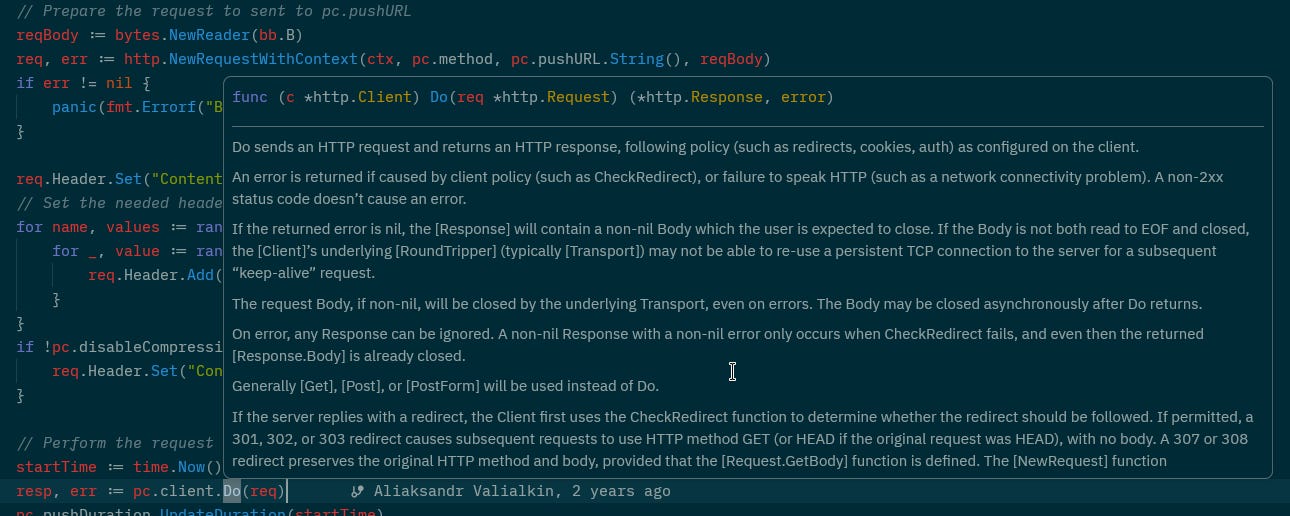
Next, from this buffer (still in pushMetrics()), a request body is created and headers are set:

And then the data is sent to the specified URL:
VictoriaMetrics and the Set struct
Now let’s return to “WritePrometheus() writes the collected metrics to this buffer“.
WritePrometheus() is a method of the Set structure:
func (s *Set) WritePrometheus(w io.Writer) {
  ...
}
And Set is created when we call NetGauge():
func NewGauge(name string, f func() float64) *Gauge {
  return defaultSet.NewGauge(name, f)
}
defaultSet is a call to NewSet():
where defaultSet = NewSet()And NewSet() fills the Set structure:
// NewSet creates new set of metrics.
//
// Pass the set to RegisterSet() function in order to export its metrics via global WritePrometheus() call.
func NewSet() *Set {
  return &Set{
    m: make(map[string]*namedMetric),
  }
}
That is, when calling NetGauge(), we pass an argument with the name of the metric, NetGauge() calls NewSet(), passes this metric, and NewSet() initializes the Set structure, setting our metric in the namedMetric field.
Inside the PushMetrics() function implementation
With PushMetrics(), the flow is almost the same - writeMetrics is created, PushMetricsExt() is called:
func PushMetrics(ctx context.Context, pushURL string, pushProcessMetrics bool, opts *PushOptions) error {
  writeMetrics := func(w io.Writer) {
    WritePrometheus(w, pushProcessMetrics)
  }
  return PushMetricsExt(ctx, pushURL, writeMetrics, opts)
}
And PushMetricsExt() calls pushMetrics(), but only once, not in a loop:
func PushMetricsExt(ctx context.Context, pushURL string, writeMetrics func(w io.Writer), opts *PushOptions) error {
  pc, err := newPushContext(pushURL, opts)
  if err != nil {
    return err
  }
  return pc.pushMetrics(ctx, writeMetrics)
}
Okay, let’s return to our code.
So, what we need to do now is call PushMetrics() instead of WritePrometheus().
Creating context and calling PushMetrics()
For PushMetrics(), we need to pass a context that manages goroutines and terminates them either on a timeout or if the program itself receives SIGTERM or SIGKILL signals from the system.
More details about context will follow below, but for now, let’s just add import “context” and create an empty context with Background() in main():
...
import (
  “context”
...
func main() {
        ...
  // will be populated with key:value pairs:
  // ‘proj_123’ = ‘kraken_production’
  projectNames := make(map[string]string)

  ctx := context.Background()
...
In our function fetchAndPush(), add a parameter with type context.Context:
...
func fetchAndPush(ctx context.Context, ...) {
   ...
}
Add context passing to the fetchAndPush() call:
...
       fetchAndPush(ctx, client, costsRes, projectsRes, projectNames)
...
Set a variable with the VictoriaMetrics instance URL, change metrics.WritePrometheus() to metrics.PushMetrics(), to which we pass the context received from main():
...

  //metrics.WritePrometheus(os.Stdout, false)
  pushURL := “http://localhost:8428/api/v1/import/prometheus”

  if err := metrics.PushMetrics(ctx, pushURL, false, nil); err != nil {
    panic(err)
  }
}
In the pushURL, I’m using localhost where have kubectl port-forward:
$ kubectl -n ops-monitoring-ns port-forward svc/vmsingle-vm-k8s-stack 8428When we launch the exporter in Kubernetes, we will add a new environment variable passed from a Helm chart values.
At this point, the main thing left to do is to run our function on a schedule.
Using gocron for tasks scheduling
There is a nice package called gocron. Let’s add it and set it to run our fetchAndPush() function every minute:
import (
        ...
  “github.com/go-co-op/gocron”
        ...
)

...
func main() {
  s := gocron.NewScheduler(time.Local)

  s.Every(1).Minute().Do(func() {
    fetchAndPush(client, costsRes, projectsRes, projectNames)
  })

  s.StartBlocking()
}
Then we can change it to call once an hour - s.Every(1).Hour().Do( ... ), or at the beginning of each hour - s.Cron(”0 * * * *”).Do( ... ).
And finally, launch the cron with StartBlocking(), which blocks the finishing of the main() function itself.
Open access to VictoriaMetrics in Kubernetes, if not done yet:
$ kk -n ops-monitoring-ns port-forward svc/vmsingle-vm-k8s-stack 8428Let’s launch our exporter:
$ go run main.go
test_openai_stats{type=”costs”, project=”assistant_test_eval”} 6.501765299999999
test_openai_stats{type=”costs”, project=”default_project”} 0.6592560500000001
test_openai_stats{type=”costs”, project=”knowledge_base”} 2.17411225
test_openai_stats{type=”costs”, project=”kraken_production”} 0.6471627999999999
^Csignal: interrupt
And check the data in VictoriaMetrics:
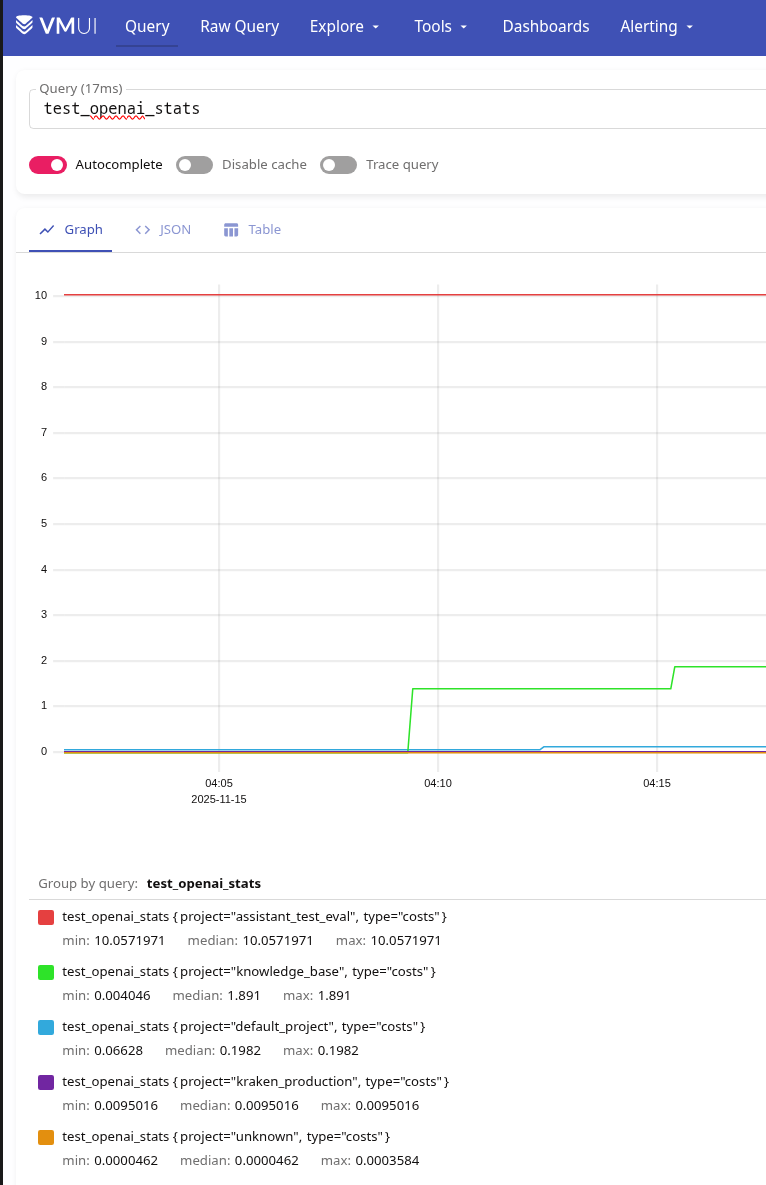
However, some “unknown“ project has appeared here, so logging will need to be added.
What else needs to be fixed:
currently, the initialization of the
CostsResponseDataandProjectsResponsestructures is performed inmain(), and then data is written to them each timefetchAndPush()is calledif a project is deleted from OpenAI, it will remain in the structures, and we will continue to write metrics for a project that no longer exists
thus, this needs to be moved to the
fetchAndPush()and simply filled in from scratch each time
the same for the
projectNames- move initialization tofetchAndPush()itselfSetQueryParams- currently passed identically for bothgetOpenAi()calls, but there is nogroup_byparameter for the/organization/projectsOpenAI endpointin the label metric, it is better to replace
type=”“withcategory=”“need to add external labels - something like “
job=”openai-exporter”“instead of using
panic(err), return an error to the calling function, handle it there, and log messagesadd correct handling of
SIGTERMandSIGINTsignalsresty.clientcan perform retries in case of errors, so we can addSetRetryCount()andSetRetryWaitTime()and add execution and error logs
Creating a Golang context
While working in our code, several simultaneous operations are launched - with gocron.NewScheduler() we launch the execution of our function fetchAndPush() which makes HTTP requests with resty.Client.Get(), and VictoriaMetrics launches its operations to write to the VictoriaMetrics endpoint.
To shut the application down gracefully instead of simply “killing” it when receiving SIGINT or SIGTERM, Go allows us to control the termination process of our functions and goroutines through the context of execution.
Another example of when we need to control the execution of an operation is to set a time limit for execution, as it is done, for example, in the VictoriaMetrics Go client for the InitPushExtWithOptions() function:
...
  go func() {
    ticker := time.NewTicker(interval)
    defer ticker.Stop()
    stopCh := ctx.Done()
    for {
      select {
      case <-ticker.C:
        ctxLocal, cancel := context.WithTimeout(ctx, interval+time.Second)
        err := pc.pushMetrics(ctxLocal, writeMetrics)
...
Here, the execution of pc.pushMetrics() is limited by interval, which is passed when calling InitPush().
At the same time, the execution context includes not only signal handling and lifecycle management of functions and goroutines, but also other information related to this execution:
Package context defines the Context type, which carries deadlines, cancellation signals, and other request-scoped values across API boundaries and between processes
I moved the details about context to a dedicated section - Bonus: How execution control works with Go context below - because it is a very interesting mechanism, and now let’s just add it to our code.
So, what do we need:
create a context
create a “signal interceptor”
SIGINT(Ctrl+C) andSIGTERM(a signal from the operating system when the program execution ends, for example, when kubelet stops the container)send a stop signal to all child functions and goroutines
complete execution of
main()
To do this, instead of calling context.Background() in main(), we can use signal.NotifyContext() which receives the necessary system calls and sends a stop signal to all related tasks:
...
  rootCtx, rootCancel := signal.NotifyContext(
    context.Background(),
    os.Interrupt,
    syscall.SIGTERM,
  )
  defer rootCancel()
...
Next, we have the call of the gocron.NewScheduler(), and at the end of the main() we launch the creation and reading from the channel:
...
  // block until Ctrl+C cancels rootCtx
  <-rootCtx.Done()
}
As soon as NotifyContext() receives SIGTERM, it closes the channel rootCtx.Done() channel, after which all child context channels will be closed in cascade, then all child goroutines listening to these contexts will terminate, and main() will be able to terminate correctly.
resty.client can also work with context via SetContext() to which we pass our rootCtx when calling if err := getOpenAI(ctx, ... ) {...}.
The Final result of the OpenAI Exporter code
After all the edits, the entire exporter code now looks like this:
package main

import (
	“context”
	“fmt”
	“log”
	“os”
	“os/signal”
	“strconv”
	“strings”
	“syscall”
	“time”

	“github.com/VictoriaMetrics/metrics”
	“github.com/go-co-op/gocron”
	“github.com/go-resty/resty/v2”
)

const (
	// base URL of the OpenAI Admin API
	baseURL = “https://api.openai.com/v1”

	// endpoints that we call
	costsPath    = “/organization/costs”
	projectsPath = “/organization/projects”

	// VictoriaMetrics push endpoint (Prometheus remote write format)
	//pushURL = “http://localhost:8428/api/v1/import/prometheus”
)

// structure describing the JSON for costs API
// resty will unmarshal into this struct automatically
type CostsResponseData struct {
	Data []struct {
		Results []struct {
			ProjectID string `json:”project_id”`
			Amount    struct {
				Value float64 `json:”value”`
			} `json:”amount”`
		} `json:”results”`
	} `json:”data”`
}

// structure describing the JSON for projects API
// used to map project_id → readable project name
type ProjectsResponse struct {
	Data []struct {
		ID   string `json:”id”`
		Name string `json:”name”`
	} `json:”data”`
}

// normalizeLabel converts a project name into a Prometheus-safe label
// - lowercases
// - replaces spaces with underscores
// - replaces slashes to avoid label parser issues
func normalizeLabel(s string) string {
	s = strings.ToLower(s)
	s = strings.ReplaceAll(s, “ “, “_”)
	s = strings.ReplaceAll(s, “/”, “_”)
	return s
}

// getOpenAI performs a GET request to the OpenAI Admin API
// and unmarshals the returned JSON into the ‘out’ structure.
//
// ctx: allows cancellation (we pass rootCtx so Ctrl+C cancels requests)
// client: the resty client with authentication
// path: “/organization/costs” or “/organization/projects”
// params: optional query parameters
func getOpenAI(ctx context.Context, client *resty.Client, path string, params map[string]string, out any) error {
	// create HTTP request object
	req := client.R().
		SetContext(ctx). // attach context so cancellation works
		SetResult(out)   // register target structure for unmarshalling JSON

	// set optional query parameters
	if params != nil {
		req.SetQueryParams(params)
	}

	// perform request
	resp, err := req.Get(baseURL + path)
	if err != nil {
		return fmt.Errorf(”http transport error calling %s: %w”, path, err)
	}

	// check HTTP status codes
	if !resp.IsSuccess() {
		return fmt.Errorf(
			“OpenAI API error: path=%s status=%d body=%s”,
			path,
			resp.StatusCode(),
			resp.String(),
		)
	}

	return nil
}

// fetchAndPush performs one exporter cycle:
//
// 1. fetch costs grouped by project_id
// 2. fetch readable project names
// 3. build project_id → normalized_name map
// 4. create/update Prometheus gauges
// 5. push all metrics to VictoriaMetrics
//
// ctx: the root context (cancelled when Ctrl+C is pressed)
func fetchAndPush(ctx context.Context, client *resty.Client, vmUrl string) error {
	// create fresh response holders for every iteration
	costsRes := &CostsResponseData{}
	projectsRes := &ProjectsResponse{}
	projectNames := make(map[string]string)

	// build query parameters for costs API
	// start_time: current timestamp (Unix)
	// group_by: instruct API to group costs per project_id
	timeNow := strconv.FormatInt(time.Now().Unix(), 10)
	costParams := map[string]string{
		“start_time”: timeNow,
		“group_by”:   “project_id”,
	}

	// fetch costs data
	if err := getOpenAI(ctx, client, costsPath, costParams, costsRes); err != nil {
		return fmt.Errorf(”fetch costs: %w”, err)
	}

	// fetch project definitions
	if err := getOpenAI(ctx, client, projectsPath, nil, projectsRes); err != nil {
		return fmt.Errorf(”fetch projects: %w”, err)
	}

	// fill map: project_id → normalized_label
	for _, p := range projectsRes.Data {
		projectNames[p.ID] = normalizeLabel(p.Name)
	}

	// process returned costs
	for _, dataItem := range costsRes.Data {
		for _, result := range dataItem.Results {
			id := result.ProjectID
			amount := result.Amount.Value

			// resolve project readable name
			project := projectNames[id]
			if project == “” {
				project = “unknown”
			}

			metricName := fmt.Sprintf(
				`openai_stats{project=”%s”,category=”costs”}`,
				project,
			)

			// get or create gauge
			gauge := metrics.GetOrCreateGauge(metricName, nil)

			// update gauge value
			gauge.Set(amount)

			// log written metric
			// explanation: this log helps to debug what exactly was pushed
			log.Printf(”metric updated: name=%s value=%f”, metricName, amount)
		}
	}

	// push metrics with job=”openai_exporter”
	pushOpts := &metrics.PushOptions{
		ExtraLabels: `job=”openai_exporter”`,
	}

	// push all collected metrics
	if err := metrics.PushMetrics(ctx, vmUrl, false, pushOpts); err != nil {
		return fmt.Errorf(”push metrics: %w”, err)
	}

	return nil
}

func main() {
	// create a context that automatically cancels on OS signals (Ctrl+C, kill, SIGTERM)
	//
	// how it works:
	// - signal.NotifyContext wraps the parent context and subscribes it to OS signals
	// - when the program receives Ctrl+C (SIGINT) or SIGTERM:
	//       Go internally calls rootCancel()
	//       the context’s Done() channel is closed
	// - all goroutines waiting on <-rootCtx.Done() are instantly unblocked
	// - any operation bound to this context (HTTP requests, timeouts, jobs)
	//       receives ctx.Err()==context.Canceled and stops gracefully
	//
	// practically:
	// - main goroutine waits for <-rootCtx.Done()
	// - when Ctrl+C arrives => rootCtx.Done() closes => program starts graceful shutdown
	//
	// ‘defer rootCancel()’ is used to clean up internal signal resources when main() exits normally
	rootCtx, rootCancel := signal.NotifyContext(
		context.Background(),
		os.Interrupt,
		syscall.SIGTERM,
	)
	defer rootCancel()

	// load OpenAI admin API key
	apiKey := os.Getenv(”OPENAI_ADMIN_KEY”)
	if apiKey == “” {
		log.Fatal(”OPENAI_ADMIN_KEY is not set”)
	}

	// load VictoriaMetrics URL admin API key
	vmUrl := os.Getenv(”VM_URL”)
	if vmUrl == “” {
		log.Fatal(”VM_URL is not set”)
	}

	// create resty client with:
	// - bearer token
	// - automatic retries (3 attempts)
	client := resty.New().
		SetAuthToken(apiKey).
		SetRetryCount(3).
		SetRetryWaitTime(2 * time.Second)

	// create scheduler using local timezone
	s := gocron.NewScheduler(time.Local)

	// register a job that runs every 1 minute
	s.Every(1).Minute().Do(func() {
		start := time.Now()

		log.Println(”starting fetch-and-push cycle”)

		// run our exporter cycle
		if err := fetchAndPush(rootCtx, client, vmUrl); err != nil {
			log.Println(”ERROR during fetchAndPush:”, err)
			return
		}

		log.Println(”fetch-and-push completed in”, time.Since(start))
	})

	log.Println(”starting scheduler...”)

	// run scheduler in background goroutine
	s.StartAsync()

	// block until Ctrl+C cancels rootCtx
	<-rootCtx.Done()

	log.Println(”received Ctrl+C, stopping scheduler...”)

	// shutdown scheduler gracefully
	s.Stop()

	log.Println(”scheduler stopped, exiting”)
}
Let’s check it out on VictoriaMetrics:
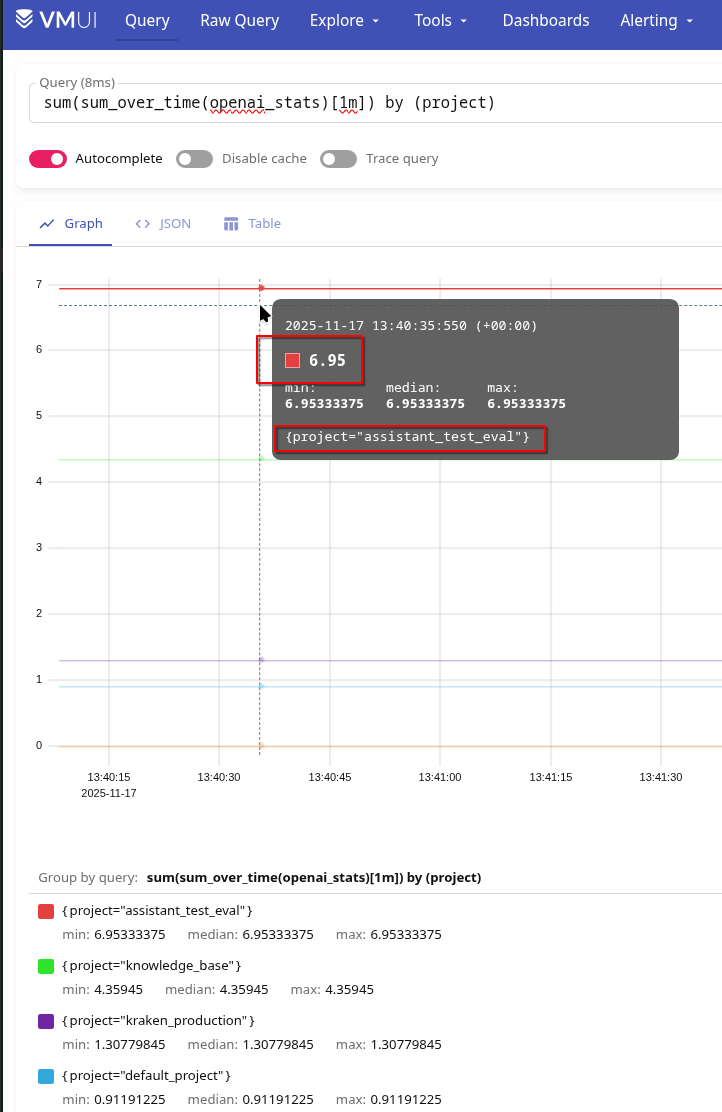
And let’s compare this with the data on OpenAI’s own website at platform.openai.com/settings/organization/usage:
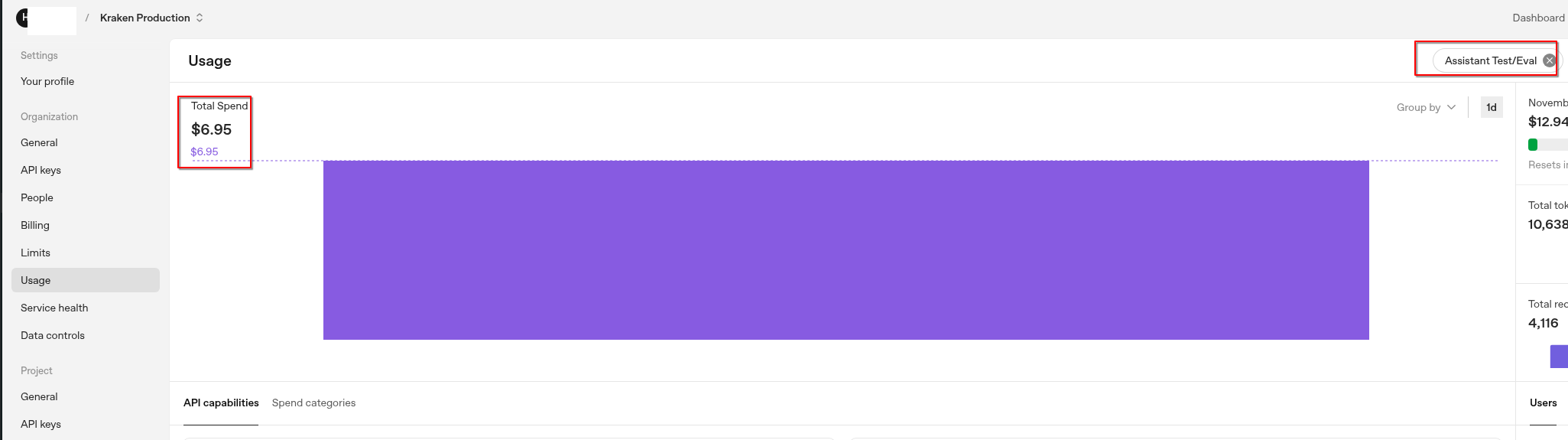
The same $6.95 that we see in VictoriaMetrics from our exporter.
The code could be improved further, for example, by breaking down the large function fetchAndPush(), and adding URL transfer to VictoriaMetrics from environment variables, but for now, we’ll live with this version.
Bonus: How execution control works with Go context
In our fetchAndPush() function we call metrics.PushMetrics(), passing a context to it.
To make things clearer, let’s take another look at InitPush(), since the use of context is most visible there.
So, InitPush() calls InitPushExt(), and InitPushExt() calls InitPushExtWithOptions(), passing it an empty context.Background() - return InitPushExtWithOptions(context.Background() ...).
So, InitPush() calls InitPushExt(), and InitPushExt() in its turn calls InitPushExtWithOptions(), passing it an empty context.Background() - the return InitPushExtWithOptions(context.Background(), ...) part.
Inside InitPushExtWithOptions(), a goroutine (go func() {}) is launched, where a local context is created:
...
        ctxLocal, cancel := context.WithTimeout(ctx, interval+time.Second)
        err := pc.pushMetrics(ctxLocal, writeMetrics)
...
Closing the channel with cancel()
When context.WithTimeout() is called, the following sequence occurs:
WithTimeout()callsWithDeadline()WithDeadline()callsWithDeadlineCause():where an object is created -
c := &timerCtx{}the
timerCtxstruct embedscancelCtxwhich means
timerCtxnow has access to all methods ofcancelCtx
next,
WithDeadlineCause()checksif dur <= 0, meaning that the deadline has already passed:calls
c.cancel(true, DeadlineExceeded, cause)returns “
return c, func() { c.cancel(false, Canceled, nil) }“, which is returned toInitPushExtWithOptions()in the partctxLocal, cancel := context. WithTimeout() and “func() { c.cancel() }”and becomescancel()c.cancel()is a method of thetimerCtx- “func (c *timerCtx) cancel()“ - and it internally callsc.cancelCtx.cancel()and
c.cancelCtx.cancel()is a method of thecancelCtxstructure -func (c *cancelCtx) cancel(), which callsd, _ := c.done.Load().(chan struct{})and calls
close(d)
So here:
func (c *cancelCtx) cancel(removeFromParent bool, err, cause error) {
...
  d, _ := c.done.Load().(chan struct{})
  if d == nil {
    ...
  } else {
    close(d)
  }
...
c.done.Load() is called from the done field of the cancelCtx structure:
type cancelCtx struct {
        ...
  done     atomic.Value          // of chan struct{}, created lazily, closed by first cancel call
        ...
}
Where Load() is a method of the Value structure:
func (v *Value) Load() (val any)That is, in the d, _ := c.done.Load().(chan struct{}), the Load() method is executed, and then a type assertion to chan struct{} is performed. After that, d becomes a channel of type chan struct{}, and close(d) is called.
And close() is a built-in Go function that closes the channel passed as an argument.
As soon as the Done() channel is closed, all goroutines waiting on <-ctx.Done() are unblocked and can finish their work properly.
In the InitPushExtWithOptions(), this is done here:
go func() {
    ...
    stopCh := ctx.Done()
    ...
    case <-stopCh:
                              ...
      return
    }
  }
}()
Closing the channel reads a zero value, which triggers the condition case =>, which ends the loop by calling return =>, which ends the entire go func() {}.
Okay.
And where did the channel come from?
How the context channel is created
In order for a function or goroutine to continuously “listen” for the channel to be closed, we call Done():
...
  go func() {
    ticker := time.NewTicker(interval)
    defer ticker.Stop()
    stopCh := ctx.Done()
      ...
      case <-stopCh:
        if wg != nil {
          wg.Done()
        }
        return
      }
...
And ctx.Done() is a method of the Context interface:
type Context interface {
...
  Done() <-chan struct{}
}
Where the channel itself is created:
...
func (c *cancelCtx) Done() <-chan struct{} {
        ...
  if d == nil {
    d = make(chan struct{})
    c.done.Store(d)
  }
  return d.(chan struct{})
}
...
So, when called:
context.WithTimeout()=>WithDeadline()=>WithDeadlineCause()=>c := &timerCtx {}which hascancelCtxа
cancelCtx {}which hasDone()
And when we call:
...
  rootCtx, rootCancel := signal.NotifyContext(
    context.Background(),
    os.Interrupt,
    syscall.SIGTERM,
  )
...
So, in the signal.NotifyContext(), we pass an empty parent context, and signal.NotifyContext() creates and returns its own context using context.WithCancel():
...
func NotifyContext(parent context.Context, signals ...os.Signal) (ctx context.Context, stop context.CancelFunc) {
  ctx, cancel := context.WithCancel(parent)
  c := &signalCtx{
           ...
  }
        ...
  return c, c.stop
}
...
Therefore, at the end of our main(), we can call reading from the channel:
...
  // block until Ctrl+C cancels rootCtx
  <-rootCtx.Done()
...
As soon as the channel is closed, control returns to the main(), where gocron.Stop() is executed and the program terminates.
Originally published at RTFM: Linux, DevOps, and system administration.
Hey, great read as always. It's wild how often you gotta build your own tools for specific AI cost tracking. Realy important work here.